Padme's Blender Addons
A place to upload my addons for Blender that help to create mods for Mass Effect Andromeda
 查看大图
查看大图[left][b][color=#e69138][size=3]What is this addon?
[/size][/color][/b]A place to upload my addons for Blender that help to create mods for Mass Effect Andromeda
The first addon I have created is for Mesh modders to help speed up the process of creating LODs
due to us not being able to reimport meshes without the same amount of LODs as the base mesh has.
[color=#f6b26b][size=3][b][/b][/size][/color][size=3][b][color=#e69138]Which blender is this compatible with?[/color][/b][/size]
Compatible with 2.92 will just get a message it might not function correctly,
I have tested it and it does work as intended.
When activating it you might get a message if you are using 2.92 as stated above, this is that message.
[img]https://i.imgur.com/MuHxbjI.png[/img]
[color=#f9cb9c][size=4][b]Addons[/b][/size][/color]
See Spoiler for more details on the addons
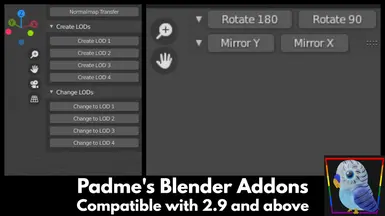
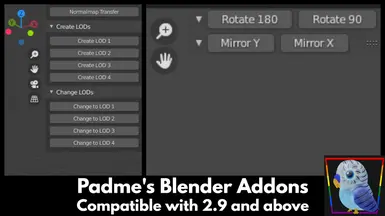
[b][size=3][color=#f6b26b][spoiler][/color][/size][/b][color=#f6b26b][size=3][b]Create LODs[/b][/size][/color]
Located in the 3D Viewport on the side panel under
Padme's Addons
Helps create level of distance meshes and change them.
Not always perfect results but works for modding.
[spoiler]
It has two sets of buttons, one Create LODs and Change LODs
Create LODs - will duplicate the mesh you have selected and add the decimate for the LOD you're creating.
Change LOD - will change the selected mesh to the decimate LOD version you click.
LOD 1 = a decimate of 0.8
LOD 2 = a decimate of 0.7
LOD 3 = a decimate of 0.6
LOD 4 = a decimate of 0.5
So what this does is speed up the process of you duplicating the mesh 4 times
adding the decimate modifier and then changing its value.
By just having to click one of the 4 buttons for each option [/spoiler]
[color=#f6b26b][size=3][b]Quick UV Buttons[/b][/size][/color]
Located in the UV Editor on the side panel under
Padme's Addons
What I have added via this addon is quick buttons to Rotate 180 or 90 degrees
and Mirror Y and Mirror X buttons[/spoiler]
[b][size=3][/size][/b][b][size=3]To Install:
[/size][/b][font=Arial][size=3][b]
[/b][/size][/font]Open Blender go to Edit > Preferences > Addons Tab > Install >
Locate the [color=#f6b26b]padme4000_addons_1.0.0.zip[/color] name will differ depending on the addon
and click install and then tick the addon in the box below to activate it
OR
Open the Zip and extract the [color=#f6b26b]padme4000_addons[/color] folder to
[color=#f6b26b]C:\Users\USERNAME\AppData\Roaming\Blender Foundation\Blender\3.0\scripts\addons[/color][/left]
![https://i.imgur.com/MuHxbjI.png[/img]](https://i.imgur.com/MuHxbjI.png%5B/img%5D)
还没有人评论,去客户端里说两句吧。
评论在新手盒子客户端中发表,这里同步展示。