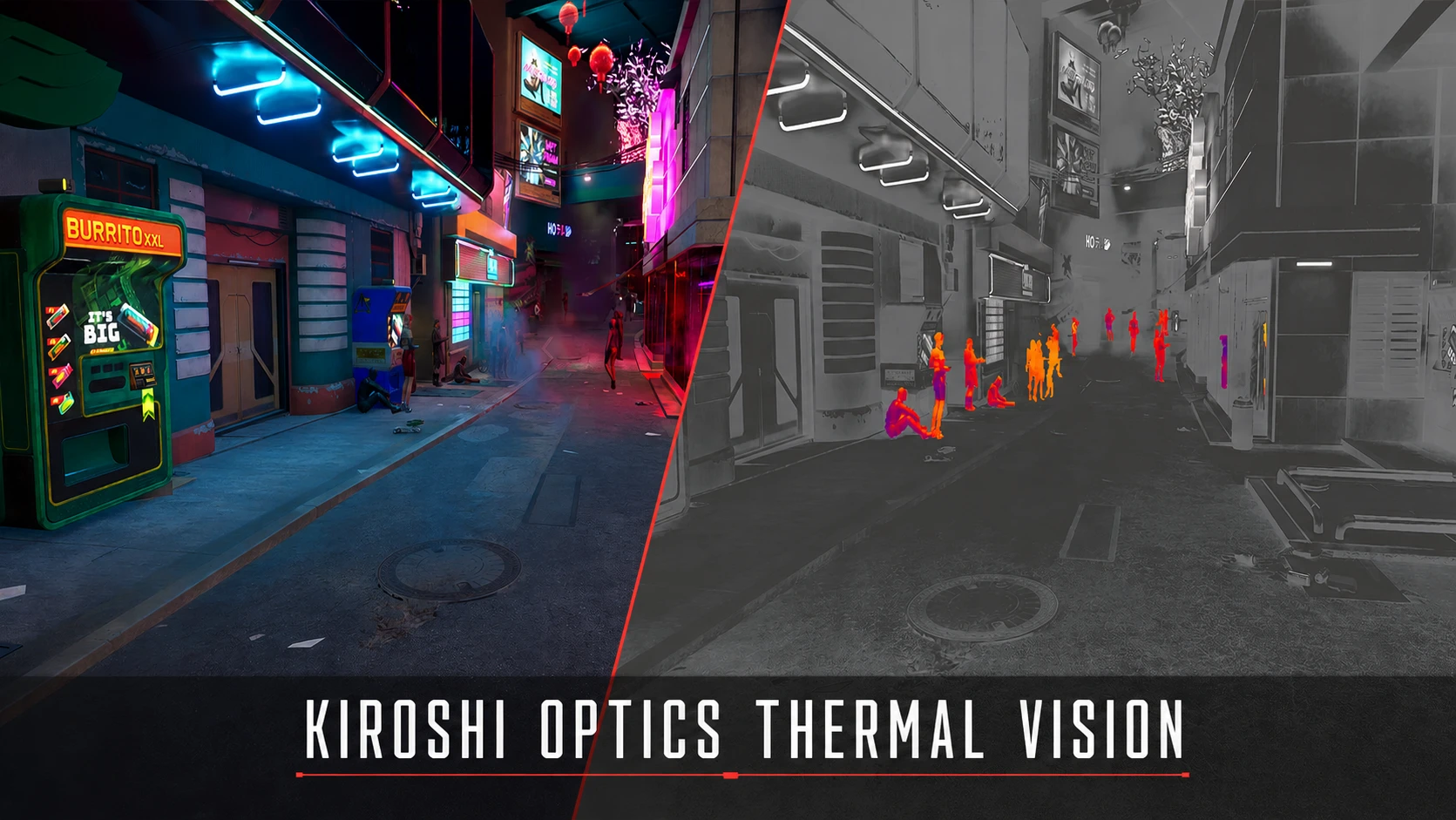
Kiroshi Optics Thermal Vision
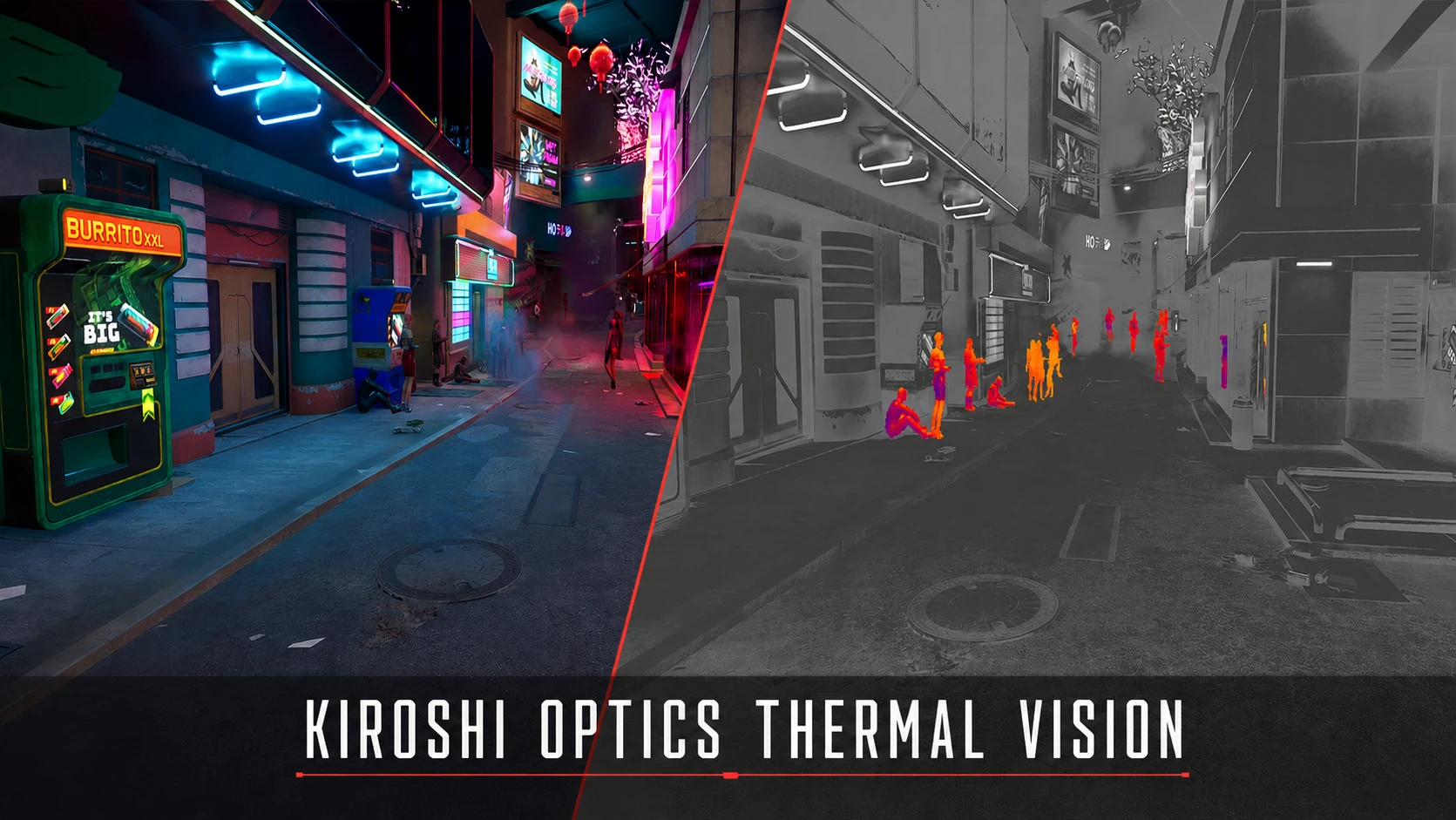
adds thermal vision with regular/black hot/white hot variants to Kiroshi Optics.
 查看大图
查看大图[center][size=6][color=#FCEE0A][b]KIROSHI OPTICS THERMAL VISION[/b][/color][/size]
[size=4][color=#00F0FF]Three thermal signatures. Built into your Kiroshis.[/color][/size][/center]
[line]
[center][img]https://i.ibb.co/Xk2yzBMZ/thermal-vision-showcase.gif[/img][/center]
[size=5][color=#FCEE0A][b]▍ OVERVIEW[/b][/color][/size]
Kiroshi Optics Thermal Vision turns every Tier 3 or higher optic into a three-mode thermal imaging system. People stand out immediately while the rest of Night City remains readable.
[line]
[size=5][color=#FCEE0A][b]▍ THERMAL MODES[/b][/color][/size]
[list]
[][b][color=#00F0FF]Normal Thermal[/color][/b] — a classic heat-map view built for quick target acquisition.[/]
[][b][color=#00F0FF]Red/Black Hot[/color][/b] — deep blacks with aggressive red heat signatures.[/]
[][b][color=#00F0FF]White Hot[/color][/b] — a stark monochrome view with bright human silhouettes.[/]
[/list]
The mod checks every equipped eye slot. Vanilla and compatible modded optics qualify automatically when they are Tier 3 or higher, including optics installed through additional cyberware slots.
[line]
[size=5][color=#FCEE0A][b]▍ CONTROLS[/b][/color][/size]
[list]
[][b]F10[/b] — activate or deactivate Thermal Vision.[/]
[][b]Left Shift + F10[/b] — cycle modes while Thermal Vision is active.[/]
[/list]
Activation and cycling are separate commands. The selected mode is remembered when Thermal Vision is switched off, so F10 always returns to the mode you last used.
Keyboard and controller buttons can be changed under [b]Mod Settings → Kiroshi Optics Thermal Vision[/b]. Both commands support optional modifiers.
[line]
[size=5][color=#FCEE0A][b]▍ NIGHT VISION INTEGRATION[/b][/color][/size]
The integration is included in the main download and supports [url=https://www.nexusmods.com/cyberpunk2077/mods/8326]Kiroshi Optics Night Vision Mod[/url] or [url=https://www.nexusmods.com/cyberpunk2077/mods/28627]True Night Vision[/url].
When the selected Night Vision system recognizes the equipped optics, Thermal Vision's activation command becomes one shared spectral control:
[list]
[]First press — Night Vision.[/]
[]Second press — your selected Thermal Vision mode.[/]
[]Third press — off.[/]
[/list]
Thermal Vision's separate mode-cycle command continues to switch between Normal Thermal, Red/Black Hot, and White Hot.
Each Night Vision mod keeps its own optics and battery rules. The provider can be changed or disabled under [b]Mod Settings → Kiroshi Optics Thermal Vision → Integration[/b].
[line]
[size=5][color=#FCEE0A][b]▍ REQUIREMENTS[/b][/color][/size]
[list]
[][url=https://www.nexusmods.com/cyberpunk2077/mods/2380][/url][url=https://www.nexusmods.com/cyberpunk2077/mods/4198]ArchiveXL[/url][/]
[][url=https://www.nexusmods.com/cyberpunk2077/mods/1511]redscript[/url][/]
[][url=https://www.nexusmods.com/cyberpunk2077/mods/7780]Codeware[/url][/]
[][url=https://www.nexusmods.com/cyberpunk2077/mods/4197]TweakXL[/url][/]
[][url=https://www.nexusmods.com/cyberpunk2077/mods/4885]Mod Settings[/url][/]
[/list]
[b]Optional — Night Vision integration:[/b]
[list]
[][url=https://www.nexusmods.com/cyberpunk2077/mods/8326]Kiroshi Optics Night Vision Mod[/url][/]
[][url=https://www.nexusmods.com/cyberpunk2077/mods/28627]True Night Vision[/url][/]
[/list]
[line]
[size=5][color=#FCEE0A][b]▍ INSTALLATION[/b][/color][/size]
[b]Mod manager:[/b] install the archive normally with Vortex or Mod Organizer 2.
[b]Manual:[/b] install the requirements, then extract the archive into the Cyberpunk 2077 game directory.
[line]
[size=5][color=#FCEE0A][b]▍ COMPATIBILITY[/b][/color][/size]
The ability checks every equipped eye slot and activates from any Tier 3 or higher optic. It does not require a specific named Kiroshi model.
[line]
[size=5][color=#FCEE0A][b]▍ CREDITS[/b][/color][/size]
[url=https://www.nexusmods.com/cyberpunk2077/mods/8326]Kiroshi Optics Night Vision Mod[/url] by [b]keanuWheeze[/b] — inspiration for tying expanded vision modes to equipped Kiroshi optics.
[line]
[center][/center]
![https://i.ibb.co/Xk2yzBMZ/thermal-vision-showcase.gif[/img][/center]](https://i.ibb.co/Xk2yzBMZ/thermal-vision-showcase.gif%5B/img%5D%5B/center%5D)
正在加载版本记录…
正在加载评论…
评论在新手盒子客户端中发表,这里同步展示。