MonsterAttention
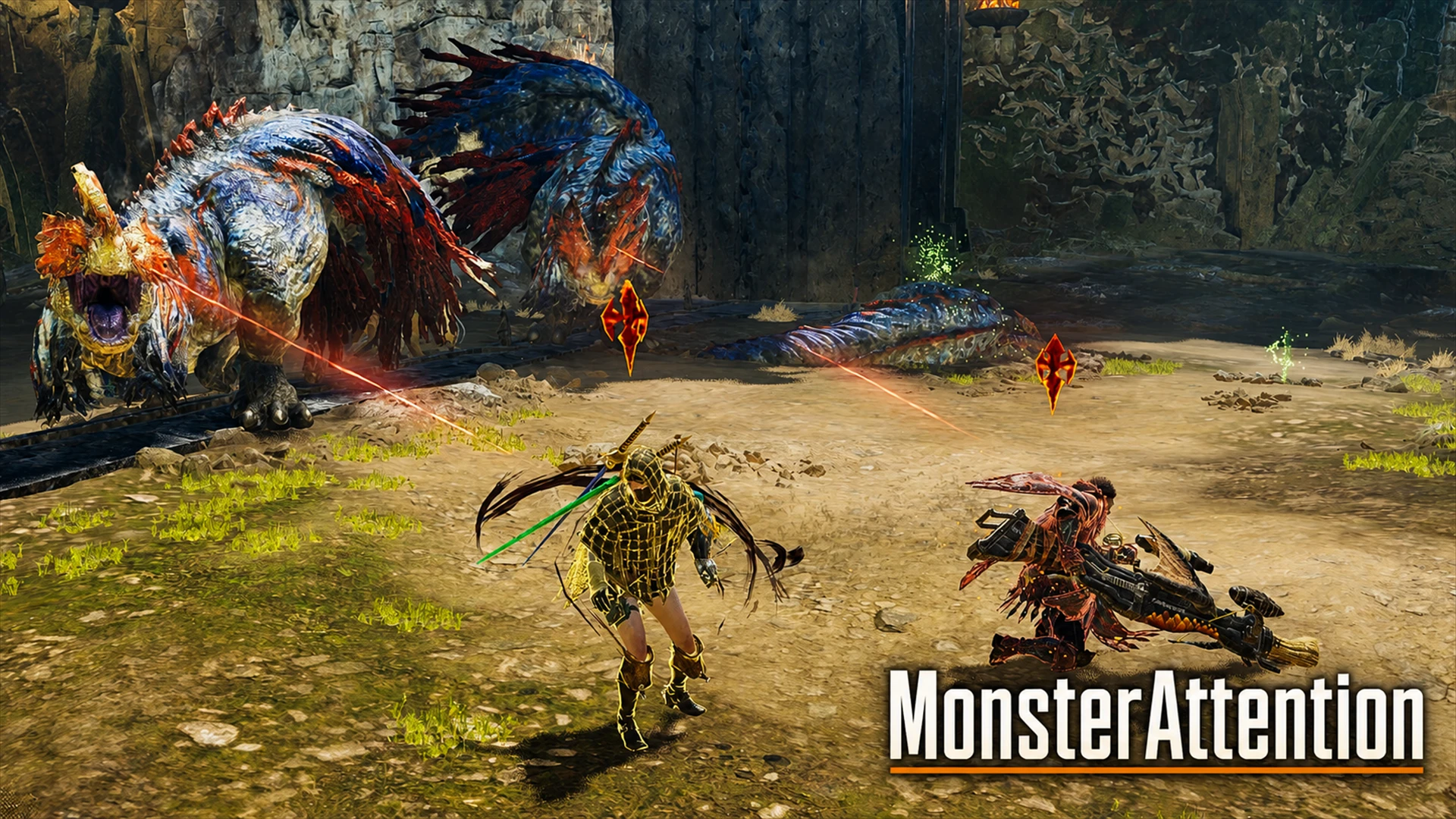
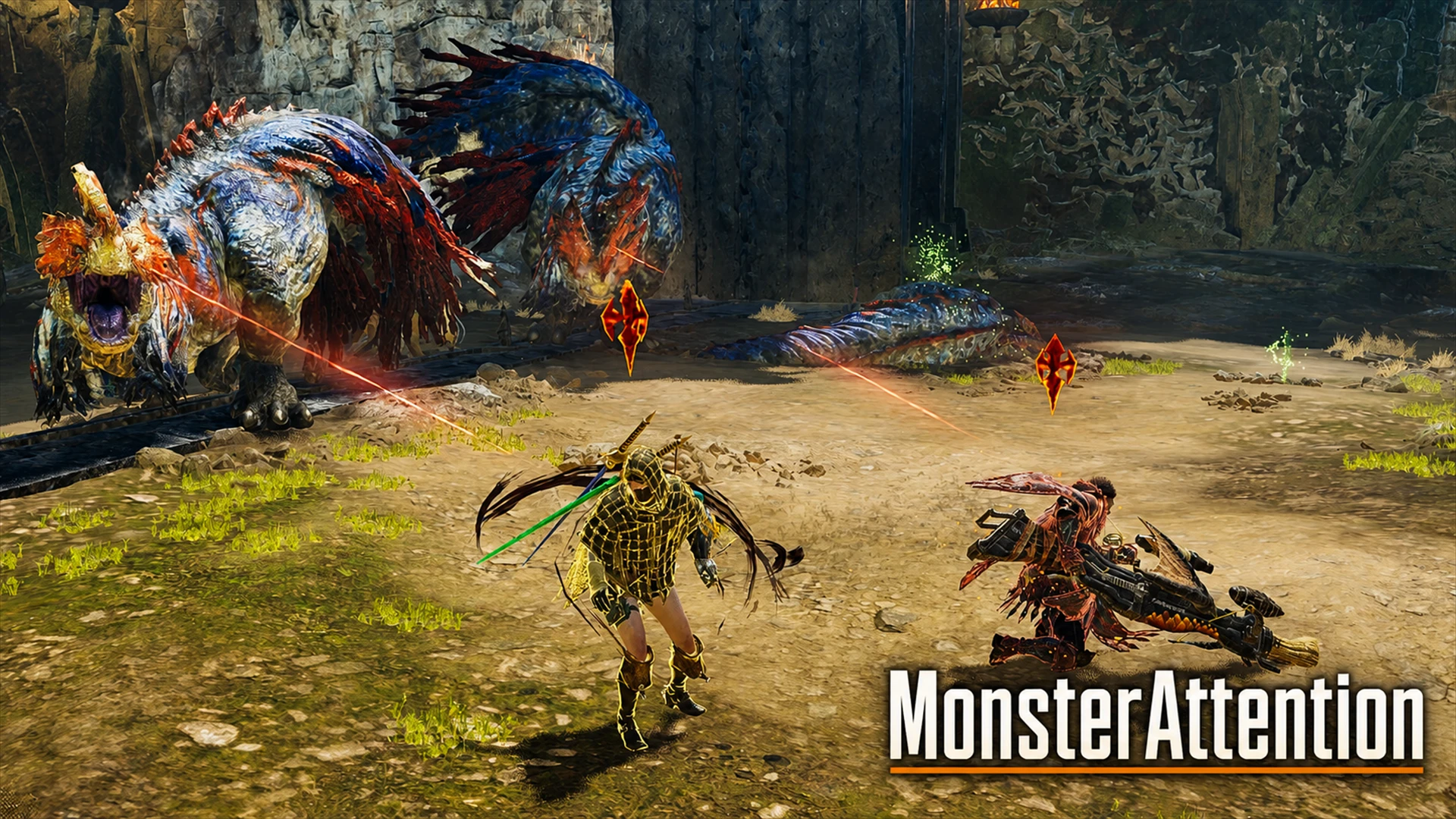
Shows a Mustard Bomb marker above the hunter or Palico targeted by a large monster, with red target lines between them. Supports solo, multiplayer, Support Hunters and Palicoes.
 查看大图
查看大图[center][size=5][b]MonsterAttention[/b][/size][/center]
[size=4][b]English[/b][/size] MonsterAttention makes it easy to see who each large monster is currently targeting. The mod displays:
[list]
[]A Mustard Bomb marker above the targeted hunter or Palico[/]
[]Red target lines between the monster and its current target[/]
[]Target information for up to three large monsters at the same time[/]
[/list]It supports solo play, multiplayer, Support Hunters, Palicoes and players joining a quest in progress. [size=4][b]Monster Scope[/b][/size] Choose which large monsters are displayed from the REFramework menu:
[list]
[][b]A. Target Camera Monster[/b] Displays only the large monster selected by the in-game target camera.[/]
[][b]B. Quest Targets Only[/b] Displays only the large monsters required for the current quest. This is the default setting.[/]
[][b]C. All Large Monsters[/b] Displays all large monsters currently loaded by the game, regardless of whether they are quest targets.[/]
[/list][size=4][b]Settings[/b][/size] Open the REFramework menu with [b]Insert[/b], then select: [b]Script Generated UI > MonsterAttention[/b] Available settings:
[list]
[]Enable or disable MonsterAttention[/]
[]Language: English / Japanese / Simplified Chinese[/]
[]Monster Scope[/]
[]Show red target lines[/]
[]Show Mustard Bomb markers[/]
[]Include Palicoes[/]
[]Detailed diagnostic logging[/]
[/list]Settings are saved automatically. [size=4][b]Requirements[/b][/size]
[list]
[][url=https://www.nexusmods.com/monsterhunterwilds/mods/93]REFramework[/url][/]
[][url=https://www.nexusmods.com/site/mods/818]Fluffy Mod Manager[/url][/]
[]REFramework [b]Loose File Loader[/b] enabled[/]
[/list][size=4][b]Installation[/b][/size]
[list=1]
[]Install REFramework.[/]
[]Open the REFramework menu with [b]Insert[/b] and enable [b]Loose File Loader[/b].[/]
[]Close the game.[/]
[]Import the MonsterAttention ZIP into [url=https://www.nexusmods.com/site/mods/818]Fluffy Mod Manager[/url] without extracting it.[/]
[]Enable [b]MonsterAttention[/b].[/]
[]Start the game and enter a quest.[/]
[/list][size=4][b]Compatibility[/b][/size] MonsterAttention replaces the following common player VFX file: [font=Courier New]natives/STM/Art/VFX/EffectProvider/Player/pl_cm/epvr_hm_cm.pfb.18[/font] Other mods replacing the same file may conflict with MonsterAttention. If the Mustard Bomb marker does not appear or abnormal effects are displayed, check for another mod that replaces this PFB. This is a Beta release. Feedback and bug reports are welcome. [size=4][b]Credits[/b][/size]
[list]
[]Capcom — Monster Hunter Wilds and original game assets[/]
[]praydog and [url=https://www.nexusmods.com/monsterhunterwilds/mods/93]REFramework[/url] contributors[/]
[]FluffyQuack — [url=https://www.nexusmods.com/site/mods/818]Fluffy Mod Manager[/url][/]
[/list]
[line]
[size=4][b]日本語[/b][/size] MonsterAttentionは、大型モンスターが現在誰を狙っているのかを分かりやすく表示するMODです。 次の情報を戦闘中に表示します。
[list]
[]狙われているハンターやオトモの頭上にマスタードボムマーカーを表示[/]
[]モンスターと現在狙われている対象の間に赤いターゲットラインを表示[/]
[]同時に最大3体の大型モンスターのターゲット情報を表示[/]
[/list]ソロ、マルチプレイ、サポートハンター、オトモ、クエストへの途中参加に対応しています。 [size=4][b]モンスターの選択範囲[/b][/size] REFrameworkメニューから、表示する大型モンスターの範囲を選択できます。
[list]
[][b]A. ターゲットカメラ対象[/b] ゲーム内のターゲットカメラで選択している大型モンスターだけを表示します。[/]
[][b]B. クエスト対象のみ[/b] 現在のクエストで狩猟・討伐対象になっている大型モンスターだけを表示します。初期設定はこちらです。[/]
[][b]C. 全大型モンスター[/b] 現在ゲームに読み込まれている大型モンスターを、クエスト対象かどうかに関係なく表示します。[/]
[/list][size=4][b]設定[/b][/size] [b]Insert[/b]キーでREFrameworkメニューを開き、次を選択してください。 [b]Script Generated UI > MonsterAttention[/b] 設定できる項目:
[list]
[]MonsterAttentionの有効/無効[/]
[]言語:英語/日本語/簡体中国語[/]
[]モンスターの選択範囲[/]
[]赤いターゲットラインの表示[/]
[]マスタードボムマーカーの表示[/]
[]オトモを含める[/]
[]詳細な診断ログ[/]
[/list]設定は自動的に保存されます。 [size=4][b]必要なもの[/b][/size]
[list]
[][url=https://www.nexusmods.com/monsterhunterwilds/mods/93]REFramework[/url][/]
[][url=https://www.nexusmods.com/site/mods/818]Fluffy Mod Manager[/url][/]
[]REFrameworkの [b]Loose File Loader[/b] を有効化[/]
[/list][size=4][b]インストール[/b][/size]
[list=1]
[]REFrameworkをインストールします。[/]
[][b]Insert[/b]キーでREFrameworkメニューを開き、[b]Loose File Loader[/b]を有効にします。[/]
[]ゲームを終了します。[/]
[]MonsterAttentionのZIPを解凍せず、そのまま[url=https://www.nexusmods.com/site/mods/818]Fluffy Mod Manager[/url]へ追加します。[/]
[][b]MonsterAttention[/b]を有効にします。[/]
[]ゲームを起動してクエストへ入ると、自動的に動作します。[/]
[/list][size=4][b]互換性と競合[/b][/size] MonsterAttentionは、次のプレイヤー共通VFXファイルを置き換えます。 [font=Courier New]natives/STM/Art/VFX/EffectProvider/Player/pl_cm/epvr_hm_cm.pfb.18[/font] 同じファイルを置き換える別のMODとは競合する可能性があります。マスタードボムマーカーが表示されない場合や、異常なエフェクトが表示される場合は、このPFBを置き換える別MODがないか確認してください。 本バージョンはBeta版です。不具合や気になる動作があれば報告してください。 [size=4][b]クレジット[/b][/size]
[list]
[]Capcom — Monster Hunter Wildsおよびゲーム内の原作アセット[/]
[]praydogおよび[url=https://www.nexusmods.com/monsterhunterwilds/mods/93]REFramework[/url]のコントリビューター[/]
[]FluffyQuack — [url=https://www.nexusmods.com/site/mods/818]Fluffy Mod Manager[/url][/]
[/list]
正在加载版本记录…
正在加载评论…
评论在新手盒子客户端中发表,这里同步展示。