随机视野
RandomVision让你提前看到由种子决定的事件结果,从而做出更明智的选择,无需不断进行存档刷取。
 查看大图
查看大图简介 / Summary
RandomVision 是一个为《Slay the Spire 2》制作的事件预览模组。
如果你不喜欢为了确认事件结果而频繁 SL(save & load),这个模组会把本来已经由种子决定、却没有在原版 UI 里明说的信息提前展示出来。
换句话说,RandomVision 不是改掉随机,而是把其实已经确定的结果尽量提前揭示给你,让你少做“进事件看一眼,不满意就读档”的重复操作。
RandomVision is an event preview mod for Slay the Spire 2.
If you dislike constantly save scumming just to check event outcomes, this mod surfaces information that is already determined by the seed but not clearly shown by the base game UI.
RandomVision does not remove randomness. Instead, it reveals as much of the already-determined result as possible ahead of time, so you can make decisions with fewer “enter event -> inspect -> reload” loops.
当前版本能做什么 / What The Current Version Does
为水晶球事件显示透视预览
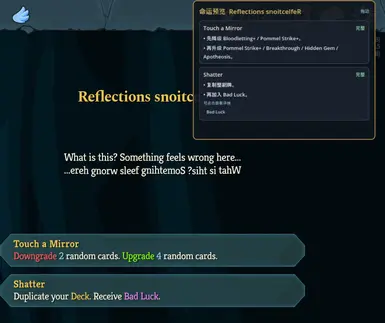
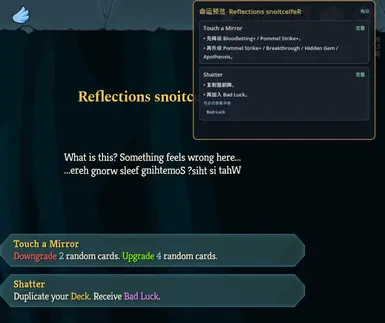
为问号事件页面显示独立预览小窗
将预览按当前选项分组显示,而不是只给一串杂乱文本
标注每个选项的预览状态:
完整 / Complete部分 / Partial已公开 / Visible
提前揭示一批原版没有直接说明的确定结果,例如:
- 随机升级、降级、移除
- 随机遗物、药水、金币
- 单卡转化结果
- 一部分事件中的实际卡牌候选
支持点击小窗里的部分卡牌 / 遗物 / 药水结果查看详情
支持拖动预览小窗位置
Crystal Sphere foresight preview
A dedicated preview panel on question mark event pages
Option-grouped previews instead of loose text dumps
Coverage labels for each option:
CompletePartialVisible
Early exposure of deterministic information that the base game does not clearly show, including:
- random upgrades, downgrades, and removals
- random relic, potion, and gold outcomes
- single-card transformation results
- selected cases with real card reward candidates shown in advance
Clickable preview entries for some card / relic / potion outcomes
Draggable preview panel
双语支持现状 / Current Bilingual Status
当前版本已经支持运行时中英双语,包括:
- 预览小窗标题
- 状态标签
- 交互提示
- 水晶球标签
RandomVision自己生成的大部分补充说明
游戏原生事件标题、选项文本本来就会跟随游戏语言;现在模组自己生成的主要 UI 文本也会尽量跟着一起切换。
需要如实说明的是:
- 这并不代表所有极边缘的动态句式都已经百分之百人工润色完成
- 但对正常使用场景来说,这一版已经可以视为支持中英双语运行
The current build now supports runtime EN/ZH bilingual output, including:
- preview panel titles
- status labels
- interaction hints
- Crystal Sphere labels
- most of the extra preview summaries generated by
RandomVision
Base-game event titles and options already follow the game language. This version extends that behavior to the mod’s own runtime UI text as well.
To stay accurate:
- this does not mean every rare edge-case sentence has been manually polished yet
- but for normal usage, this build should be treated as bilingual in actual runtime use
它适合哪些玩家 / Who This Is For
不想为了确认事件结果而反复 SL 的玩家
想更认真规划路线、金币、牌组与事件收益的玩家
喜欢“既然种子已经决定了,就应该允许我提前知道”的玩家
想降低问号事件信息不透明感的玩家
Players who do not want to save scum repeatedly just to confirm event outcomes
Players who want cleaner planning around routing, gold, deck changes, and event value
Players who believe seed-determined information should be visible when it can be safely revealed
Players who want less opacity in question mark events
它不会做什么 / What It Does Not Try To Do
- 它不会篡改事件 RNG
- 它不会直接替你做选择
- 它不会在无法安全确定时伪造一个“唯一正确答案”
如果一个事件的后果仍然依赖:
- 你后续选哪张牌
- 你的选牌顺序
- 后续战斗或奖励流程
那么 RandomVision 会停在“当前最深可确定层”,而不会为了显得聪明去编造一个其实还不确定的结果。
- It does not alter event RNG
- It does not make decisions for you
- It does not invent a fake “final answer” when the result is not yet safely deterministic
If an event still depends on:
- which card you choose later
- the order of your selections
- later combat / reward flow
then RandomVision only shows the deepest safely-deterministic layer instead of pretending the rest is already fixed.
安装方法 / Installation
完全退出游戏。
将发布包中的
mods/RandomVision文件夹复制到游戏根目录下的mods文件夹中。启动游戏并确认模组已加载。
Close the game completely.
Copy the included
mods/RandomVisionfolder into your game’smodsdirectory.Launch the game and confirm the mod is loaded.
使用方式 / How To Use
进入事件页面后,右侧会出现预览小窗
小窗会按当前选项显示结果摘要
一部分确定结果会作为可点击条目显示,点击后可查看详情
你可以拖动小窗,把它移动到更顺手的位置
When you enter an event page, a preview panel appears on the right
The panel summarizes the current options
Some deterministic outcomes appear as clickable entries you can inspect
You can drag the panel to a more comfortable position
当前边界 / Current Limits
不是所有事件都能在第一页完全展开
多卡转化、依赖选牌顺序的事件,只能显示到当前最安全的确定层
一部分事件已经支持显示实际卡牌候选,但覆盖还会继续扩展
某些极少见的动态描述,在英文下可能仍有继续润色空间
Not every event can be fully unfolded from the first page
Multi-card transformations and order-dependent selections are only shown up to the safest deterministic depth
Real card candidate preview already exists for selected events, but coverage will continue expanding
A few rare dynamic descriptions may still need extra English polish
为什么值得装 / Why Install It
如果你最讨厌的体验之一是:
“我知道这东西大概率已经被种子决定了,但游戏就是不告诉我,于是我只能存档、进事件、看结果、再决定要不要读档。”
那 RandomVision 就是为这个痛点做的。
If one of your least favorite gameplay loops is:
“I know this is probably already decided by the seed, but the game refuses to show it, so I save, enter the event, inspect the outcome, and then decide whether to reload.”
then RandomVision is built specifically for that pain point.
后续方向 / Future Direction
扩展更多事件的确定结果预览
扩展更多“实际卡牌候选”与“实际转化结果”场景
继续打磨英文句式和边缘文本
继续优化小窗交互与可读性
Expand deterministic preview coverage for more events
Add more exact card candidate and transformation preview cases
Continue polishing English phrasing and edge-case text
Keep improving panel interaction and readability
正在加载版本记录…
正在加载评论…
评论在新手盒子客户端中发表,这里同步展示。