Trinity - Mod Menu and In-Game Trainer (1.18.01)
An internal DirectX 12 mod menu for Crimson Desert (1.18.00). Features multi-storage inventory editor, 1-click batch gear enhancers, live dye editor, unlimited coordinate bookmarks, auto destination teleport, and custom themes.
 查看大图
查看大图
[size=5][b]Trinity — Internal DirectX 12 Mod Menu for Crimson Desert[/b][/size]
[i]Enhanced and updated for 1.18.00 by Lian (v1.1.1 Multi-Language Release)[/i]
---
[size=4][b]Overview[/b][/size]
Trinity is a native, internal DirectX 12 mod menu and trainer for Crimson Desert. This release brings a complete multi-language localization system (English, Simplified Chinese, and Korean), full multi-storage inventory alignment, 1-click batch gear enhancers, live equipment dye recolouring, unlimited custom location bookmarks, and accurate map destination teleportation.
---
[size=4][b]Key Features[/b][/size]
[b]1. Multi-Language & Localization (New in v1.1.1)[/b]
* [b]Multi-Language UI Support:[/b] Native in-game support for English, Simplified Chinese (简体中文), and Korean (한국어).
* [b]Dynamic File Detection:[/b] Automatically scans for external translation files (
[code]Trinity_zh.ini[/code],
[code]Trinity_ko.ini[/code]) and dynamically adjusts the in-game Language dropdown in the SYSTEM tab.
* [b]Preserved In-Game Item Names:[/b] Mod Menu UI is fully localized while in-game item and equipment names remain in their original game format for maximum compatibility.
* [b]Dynamic Bookmark Localization:[/b] Default Saved Location names (e.g.,
[code]Location #1[/code]/
[code]위치 #1[/code]/
[code]位置 #1[/code]) automatically adapt to the active menu language.
[b]2. Player & Combat[/b]
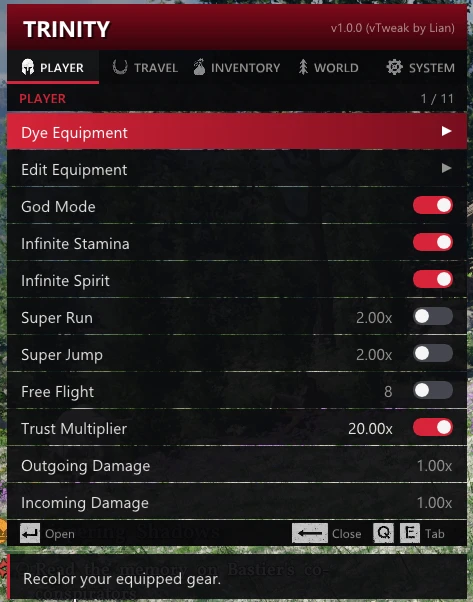
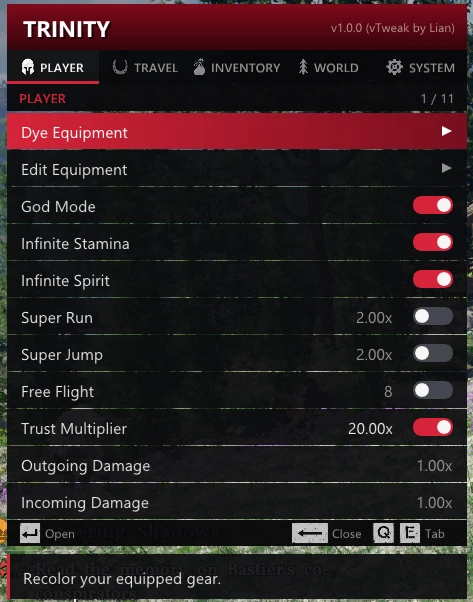
* God Mode / Infinite Health (with boss/enemy immortality protection fix)
* Infinite Stamina & Infinite Spirit
* Damage Multipliers (Outgoing / Incoming)
* Super Run, Super Jump & Free Flight Mode
[b]3. Equipment & Batch Enhancers[/b]
* [b]Repair All Gear (1-Click):[/b] Instantly restores 100% durability across all currently equipped weapons and armor.
* [b]Max Refinement (+10) All (1-Click):[/b] Instantly upgrades all worn gear to maximum enhancement level (+10).
* [b]Unlock All Abyss Sockets (1-Click):[/b] Opens all 5 Abyss sockets across all worn equipment.
* [b]Live Abyss Socket Editor:[/b] Real-time socketing of Abyss Gears (aligned for TU 1.17 - 1.18.00+).
* [b]Live Equipment Dye Editor:[/b] Real-time RGB sliders and color swatches for customizable armor and weapon dyes.
[b]4. Inventory & Item Spawner[/b]
* [b]Full Multi-Storage Alignment:[/b] Full access to 9+ game storages (Inventory, Private Storage, Bank, Wardrobe, Camp Warehouse, Pet Feeders, Housing Chests).
* [b]Item Spawner Catalog:[/b] Spawn any item, weapon, or consumable into your inventory.
* [b]Categorized Item Browsing:[/b] Localized weapon, armor, and consumable category lists.
* [b]Inventory Overrides:[/b] Max slot capacity and max stack size overrides.
[b]5. Travel & Teleportation[/b]
* [b]Destination Marker Teleport:[/b] Instant teleportation to your active map marker with live coordinate display and safe landing / fall damage protection.
* [b]Unlimited Saved Locations (Bookmarks):[/b] Bookmark unlimited custom player coordinates.
* In-place keyboard / controller [b]Rename[/b].
* 1-key direct [b]Delete (Del / X)[/b] for any specific saved spot.
* [b]Fast Travel Database:[/b] Comprehensive fast-travel points across Pywel.
[b]6. UI, System & Controls[/b]
* [b]Instant Toggle Controls:[/b] Pressing
[code]Enter[/code], or Controller
[code]A[/code]toggles options ON/OFF directly.
* [b]Custom Theme Colors:[/b] 6 dynamic menu themes (Crimson Red, Cyber Cyan, Neon Purple, Matrix Emerald, Royal Gold, Sunset Orange).
* [b]Full Controller Support:[/b] Fully navigable with Keyboard/Mouse and Xbox/PlayStation controllers.
* [b]Native DirectX 12 Font Rendering:[/b] High-performance Windows system font integration with zero frame drops.
---
[size=4][b]Default Controls[/b][/size]
* [b]Open / Close Menu:[/b]
[code]Insert/code or
[code]LB + D-Pad Down/code
* [b]Navigate Rows:[/b]
[code]Arrow Up / Down[/code]or
[code]D-Pad Up / Down[/code]* [b]Switch Tabs:[/b]
[code]Q / E[/code]or
[code]LB / RB[/code]* [b]Select / Toggle:[/b]
[code]Enter[/code]or
[code]A Button[/code]* [b]Back:[/b]
[code]Backspace / Esc[/code]or
[code]B Button[/code]* [b]Delete Bookmark / Clear:[/b]
[code]Delete[/code]or
[code]X Button[/code]
---
[size=4][b]Installation[/b][/size]
1. Download [b]Trinity-v1.1.1-vTweak-MultiLanguage.zip[/b] from the Files tab.
2. Extract the downloaded archive.
3. Copy the files into your game directory:
* [b]Standard Setup (Recommended):[/b]
Copy all files into your game executable directory (
[code]Steam\steamapps\common\Crimson Desert\bin64\[/code]):
*
[code]Trinity.asi[/code] *
[code]winmm.dll[/code](ASI Loader)
*
[code]Trinity_zh.ini[/code](Simplified Chinese translation)
*
[code]Trinity_ko.ini[/code](Korean translation)
* [b]If using a Dedicated Mod Loader / mods folder:[/b]
* Copy
[code]Trinity.asi[/code]into your
[code]mods/[/code]folder.
* Copy the language files (
[code]Trinity_zh.ini[/code]&
[code]Trinity_ko.ini[/code]) into your game's
[code]bin64/[/code]directory (where
[code]CrimsonDesert.exe[/code]is located).
4. Launch the game, load your save, and press
[code]Insert[/code]to open the menu.
5. (Optional) Navigate to [b]SYSTEM[/b] tab -> [b]Language[/b] to choose your preferred language.
---
[size=4][b]Important Notes[/b][/size]
* [b]Single-Player Only:[/b] Strictly intended for offline single-player gameplay.
* [b]Support & Feedback:[/b] Please read the installation instructions and controls above carefully. Due to limited time, I will probably not be able to answer all questions or comments in the comment section.
---
[size=4][b]Credits & Source Code[/b][/size]
* Original mod by [b]XeTrinityz[/b] — [url=https://github.com/XeTrinityz/Trinity]GitHub: XeTrinityz/Trinity[/url]
* 1.18.00 overhaul, fixes, and feature additions by [b]Lian[/b]
* Updated Source Code on GitHub: [url=https://github.com/ReXooGen/Trinity]ReXooGen/Trinity[/url]
正在加载版本记录…
正在加载评论…
评论在新手盒子客户端中发表,这里同步展示。