Crimson Desert ASI Trainer
An ASI Trainer for CD 1.15
 查看大图
查看大图[center][size=6][b][color=#E74C3C]CRIMSON DESERT TRAINER[/color][/b][/size]
[size=2][color=#8A8A8A]Title Update 1.15 [/color][/size]
[line]
[size=5][b][color=#C0392B]▌ Features[/color][/b][/size]
[size=4][b][color=#E2BA78]Inventory[/color][/b][/size]
[color=#E2BA78]▸[/color] Live list of everything in your bag: name, quantity, refine level and item key.
[color=#E2BA78]▸[/color] Instant [b]search[/b] filter as you type.
[color=#E2BA78]▸[/color] [b]Select multiple items[/b] with Ctrl click or Shift click to act on many at once.
[color=#E2BA78]▸[/color] [b]Set quantity[/b] to your own value, on the selected rows, on everything listed, or on your entire bag.
[color=#E2BA78]▸[/color] [b]Refine[/b] gear to any level, or [b]Max Refine[/b] every piece of gear to 10 in one click. Gear only.
[color=#E2BA78]▸[/color] [b]Duplicate[/b] or [b]Delete[/b] items.
[color=#E2BA78]▸[/color] [b]Bag management[/b]: see your current slots and cap, and set your bag size to any number.
[color=#E2BA78]▸[/color] [b]Category filter and Type column[/b]: narrow the list to Weapons, Armour, Consumables or Materials, and see each item's type at a glance.
[color=#E2BA78]▸[/color] [b]Shows in game names[/b] for items you add to the optional name file (see Installation); otherwise it shows the internal names.
[size=4][b][color=#4AA3DF]Player[/color][/b][/size]
[color=#4AA3DF]▸[/color] [b]God mode[/b] (infinite health), [b]infinite stamina[/b] and [b]infinite spirit[/b].
[color=#4AA3DF]▸[/color] [b]Editable combat stats[/b] held at custom values: Attack, Crit Rate, Crit Damage, Damage Taken, Attack Speed and Move Speed. Type the number you want and tick to hold it.
[color=#4AA3DF]▸[/color] [b][color=#4AA3DF]Player only.[/color][/b] Every tweak applies to you and never to NPCs or enemies.
[size=4][b][color=#1ABC9C]Teleport[/color][/b][/size]
[color=#1ABC9C]▸[/color] [b]Save and restore[/b] your position in an instant.
[color=#1ABC9C]▸[/color] [b]Named waypoints[/b], as many as you like, saved between sessions.
[color=#1ABC9C]▸[/color] [b]Teleport to the red map marker[/b]. One quick calibration, then jump to any marker you drop on the world map.
[color=#1ABC9C]▸[/color] [b]Type exact X Y Z[/b] and go, or fill the boxes with your current position.
[color=#1ABC9C]▸[/color] [b]Freeze position[/b] to hold still and resist knockback.
[color=#1ABC9C]▸[/color] [b]Hotkeys[/b]: NumPad 1 to 5 teleport to your first five waypoints, Ctrl and NumPad 1 to 5 save your spot to that slot.
[size=4][b][color=#2ECC71]Give Item[/color][/b][/size]
[color=#2ECC71]▸[/color] Browse the full item database by name.
[color=#2ECC71]▸[/color] Filter by category: Weapons, Armour, Consumables, Materials, or your Favourites.
[color=#2ECC71]▸[/color] Choose quantity and refine, then add straight to your bag.
[color=#2ECC71]▸[/color] Save any item to [b]Favourites[/b] for quick access.
[size=4][b][color=#E056A0]World and Combat Cheats[/color][/b][/size]
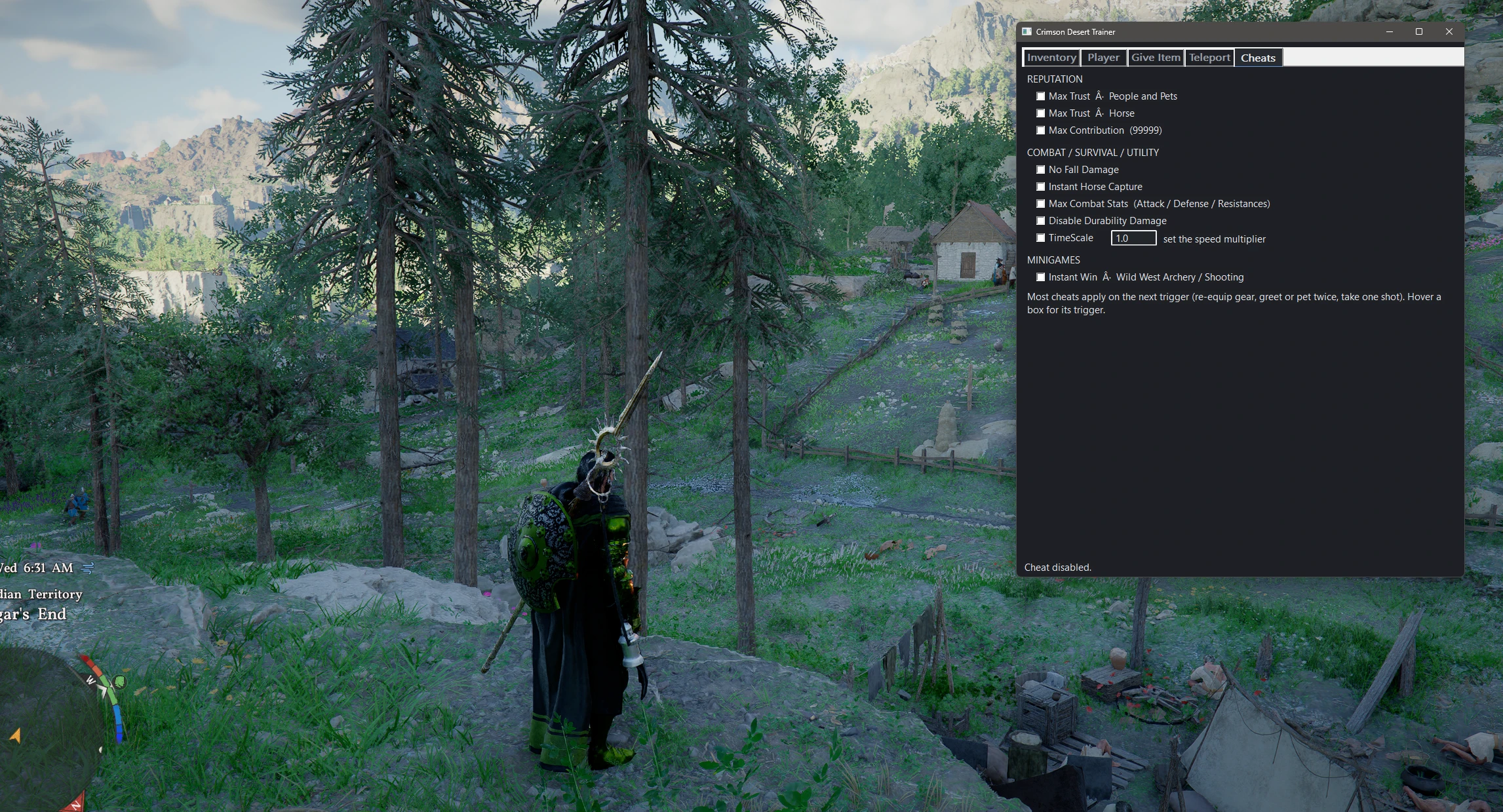
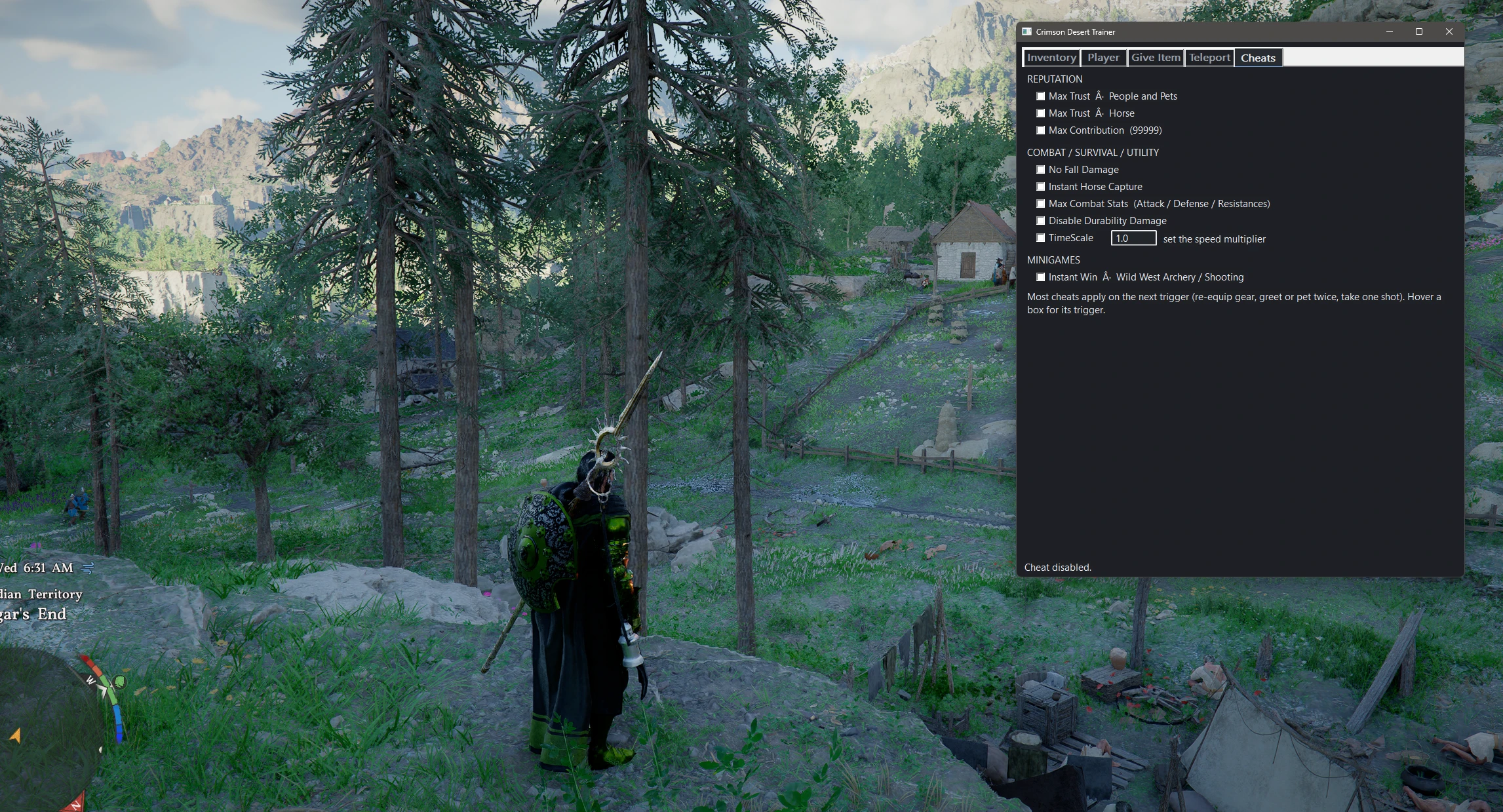
[color=#E056A0]▸[/color] [b]Max Trust[/b] for people, pets and horses.
[color=#E056A0]▸[/color] [b]Max Contribution[/b].
[color=#E056A0]▸[/color] [b]No Fall Damage[/b].
[color=#E056A0]▸[/color] [b]Instant Horse Capture[/b].
[color=#E056A0]▸[/color] [b]Max Combat Stats[/b] (Attack, Defense and resistances).
[color=#E056A0]▸[/color] [b]Disable Durability Damage[/b].
[color=#E056A0]▸[/color] [b]TimeScale[/b] to speed up or slow down the whole game.
[color=#E056A0]▸[/color] [b]Instant Win[/b] for the Wild West Archery and Shooting minigame.
[size=4][b][color=#9B59B6]Quality of life[/color][/b][/size]
[color=#9B59B6]▸[/color] Sleek dark theme that matches the game's mood.
[color=#9B59B6]▸[/color] Fully [b]resizable[/b] window. Lists, columns and controls all track the edges.
[color=#9B59B6]▸[/color] [b]Tooltips on every button[/b] so nothing is a mystery.
[color=#9B59B6]▸[/color] Remembers its position and size between sessions.
[color=#9B59B6]▸[/color] Toggle the overlay with a single key ([b]End[/b] by default, configurable).
[line]
[size=5][b][color=#E67E22]▌ Requirements[/color][/b][/size]
[color=#E67E22]▸[/color] The [b]Ultimate ASI Loader[/b] by ThirteenAG (winmm build, no renaming): [url=https://github.com/ThirteenAG/Ultimate-ASI-Loader/releases/download/x64-latest/winmm-x64.zip][color=#4AA3DF][b]Direct download[/b][/color][/url]
[color=#E67E22]▸[/color] Crimson Desert, [b]Title Update 1.15[/b].
[line]
[size=5][b][color=#C0392B]▌ Installation[/color][/b][/size]
[size=4][b][color=#E2BA78]Before you start[/color][/b][/size]
[color=#E2BA78]▸[/color] Fully close Crimson Desert.
[color=#E2BA78]▸[/color] Find your game folder. On Steam, right click [b]Crimson Desert[/b], choose [b]Manage[/b], then [b]Browse local files[/b]. Open the [b]bin64[/b] folder. The path looks like this and contains [b]CrimsonDesert.exe[/b]:
[code]...\steamapps\common\Crimson Desert\bin64\[/code]
[size=4][b][color=#E2BA78]What you need[/color][/b][/size]
[color=#E2BA78]▸[/color] [b]CrimsonInvEditor.asi[/b] from this mod's Files tab.
[color=#E2BA78]▸[/color] The [b]Ultimate ASI Loader[/b] (winmm build): [url=https://github.com/ThirteenAG/Ultimate-ASI-Loader/releases/download/x64-latest/winmm-x64.zip][color=#4AA3DF][b]Direct download[/b][/color][/url] . This build is already named [b]winmm.dll[/b], so there is nothing to rename.
[size=4][b][color=#E2BA78]Steps[/color][/b][/size]
[list=1]
[]Download the loader zip above and extract [b]winmm.dll[/b] from it. No renaming is needed.[/]
[]Copy [b]winmm.dll[/b] into [b]bin64[/b], right next to [b]CrimsonDesert.exe[/b].[/]
[]Copy [b]CrimsonInvEditor.asi[/b] into the same [b]bin64[/b] folder.[/]
[]If Windows shows a security warning on the files, right click each, choose [b]Properties[/b], tick [b]Unblock[/b], then [b]Apply[/b].[/]
[]Start the game and load into your save. Once you are in world, press [b]End[/b] to open the trainer. Press [b]End[/b] again to hide it.[/]
[/list]
[size=4][b][color=#2ECC71]Confirm it worked[/color][/b][/size]
[color=#2ECC71]▸[/color] Pressing [b]End[/b] shows a window titled [b]Crimson Desert Trainer[/b]. If it appears, you are done.
[line]
[size=5][b][color=#E2BA78]▌ How to use[/color][/b][/size]
[color=#E2BA78]▸[/color] [b]Inventory:[/b] open your bag in game once so the trainer can see it, then hit Refresh.
[color=#E2BA78]▸[/color] [b]Player stats:[/b] be in world and open the character panel once. The Player tab shows [b][color=#4AA3DF]LOCKED to player[/color][/b] when it is ready, and only then do stat tweaks apply.
[color=#E2BA78]▸[/color] [b]Refinement is gear only.[/b] Manual refine has no cap. Max Refine sets all gear to 10.
[color=#E2BA78]▸[/color] [b]Map marker teleport (one time):[/b] on the Teleport tab, open the world map and drop the RED marker ON your character, then click [b]Calibrate Marker[/b]. After that, drop a marker anywhere and click [b]Teleport to Map Marker[/b]. The calibration is saved.
[color=#E2BA78]▸[/color] [b]In game item names (optional):[/b] open [b]CrimsonInvEditor.ini[/b] next to the trainer and, under [b][Names][/b], add lines like [b]17EB=Fated Shadow[/b] (hex key on the left, the name you want on the right). The status bar reads [b]names file[/b] when it is active.
[line]
[size=5][b][color=#E74C3C]▌ Troubleshooting[/color][/b][/size]
[color=#E74C3C]▸[/color] [b]The overlay will not open with End:[/b] confirm [b]winmm.dll[/b] and [b]CrimsonInvEditor.asi[/b] are both in [b]bin64[/b] next to [b]CrimsonDesert.exe[/b] and were Unblocked. Make sure no other mod already placed a different [b]winmm.dll[/b] there.
[color=#E74C3C]▸[/color] [b]Teleport or Cheats do nothing:[/b] most effects need you to be in world, and some cheats apply on the next trigger (swap your gear, greet or pet twice, take one shot). For teleport, move once so the trainer captures your position.
[color=#E74C3C]▸[/color] [b]The inventory list is empty:[/b] open your bag in game once, then click [b]Refresh[/b].
[color=#E74C3C]▸[/color] [b]The game hangs on a loading screen after adding items:[/b] save your game right after adding, then load that save and the new items appear. If a load takes too long, Alt and F4 to quit, relaunch, and load the save. This is a game side sync quirk, not a crash.
[color=#E74C3C]▸[/color] [b]Item names look internal (like Old_Kliff_OneHandSword):[/b] the trainer shows the game's display name when it can find it, and falls back to the internal name otherwise. The status bar shows [b]names UI[/b] when display names are active. Right click a row and choose [b]Dump name fields[/b] to help improve this.
[color=#E74C3C]▸[/color] [b]The Player tab stays on searching:[/b] be in world and open the character panel so it can find your character. It shows [b]LOCKED to player[/b] when ready.
[color=#E74C3C]▸[/color] [b]Antivirus flags the file:[/b] trainers are commonly reported as false positives. Allow it or add an exclusion if you trust the source.
[color=#E74C3C]▸[/color] [b]The game updated and features stopped working:[/b] an update past Title Update 1.15 can move the memory signatures. Please wait for an updated release.
[size=5][b][color=#8A8A8A]▌ Uninstall[/color][/b][/size]
[color=#8A8A8A]▸[/color] Delete [b]winmm.dll[/b] and [b]CrimsonInvEditor.asi[/b] from [b]bin64[/b].
[line]
[size=5][b][color=#E67E22]▌ Notes and Safety[/color][/b][/size]
[color=#E67E22]▸[/color] Back up your save before making large changes.
[color=#E67E22]▸[/color] Every effect is reversible. Untick a toggle to return to normal.
[line]
[size=5][b][color=#2ECC71]▌ Changelog[/color][/b][/size][/center]
[center][/center]
[center]
[b][color=#E2BA78]v1.2[/color][/b]
[color=#2ECC71]▸[/color] [b]Item names[/b]: optional [Names] file shows the in game name for any item; new [b]Type[/b] column and [b]category filter[/b] on the Inventory tab.
[color=#2ECC71]▸[/color] [b]Map marker teleport fixed[/b] with one time auto calibration; save and restore, named waypoints, type X Y Z, freeze position and NumPad hotkeys.
[color=#2ECC71]▸[/color] [b]Cheats tab[/b]: Max Trust (people, pets, horse), Max Contribution, No Fall Damage, Instant Horse Capture, Max Combat Stats, Disable Durability, TimeScale, Instant Win minigame.
[color=#2ECC71]▸[/color] [b]Faster and safer inventory[/b]: cached name lookups, quantity clamping, a guard that stops edits writing to the wrong slot after a zone change, and correct weapon and trade good classification.
[b][color=#E2BA78]v1.1[/color][/b]
[color=#2ECC71]▸[/color] [b]Player only stats[/b]: Attack Speed, Move Speed and all stat tweaks are strictly limited to your character; NPCs are never affected.
[color=#2ECC71]▸[/color] [b]Modern UI[/b]: sleek dark theme, fully resizable window, tooltips on every control, custom values for every bulk action, full bag management, multi select.
[b][color=#E2BA78]v1.0[/color][/b]
[color=#2ECC71]▸[/color] First release: inventory editor with search, set quantity, refine, duplicate, delete, give item by name, and god mode / infinite resources.
[line]
[size=5][b][color=#E2BA78]▌ Credits[/color][/b][/size]
[color=#E2BA78]▸[/color] Ultimate ASI Loader by [b]ThirteenAG[/b].[/center]
正在加载版本记录…
正在加载评论…
评论在新手盒子客户端中发表,这里同步展示。