Crimson Desert Ultimate Cheat Engine Table Update 1.15
Crimson Desert Ultimate Cheat Engine Table Update 1.15
 查看大图
查看大图[center][size=6][b][color=#E74C3C]CRIMSON DESERT ULTIMATE TABLE[/color][/b][/size]
[size=2][color=#8A8A8A]Title Update 1.15 │ Cheat Engine[/color][/size]
[line]
[size=5][b][color=#C0392B]▌ Features[/color][/b][/size]
[size=4][b][color=#E2BA78]Inventory[/color][/b][/size]
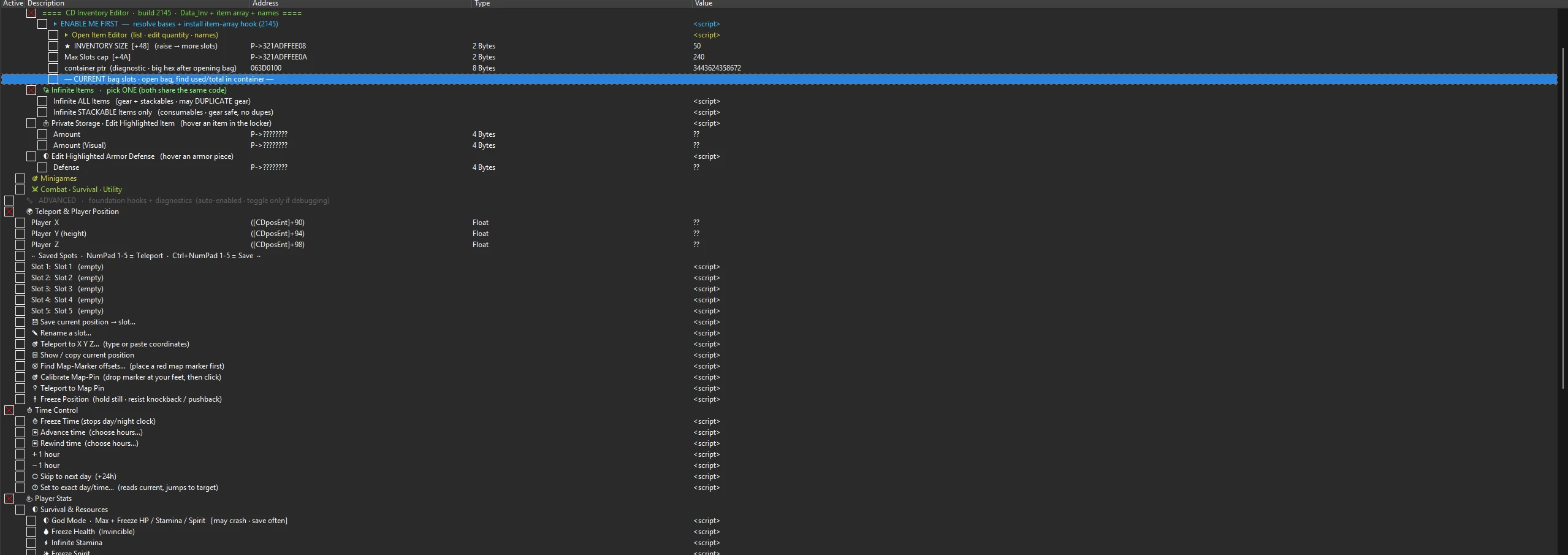
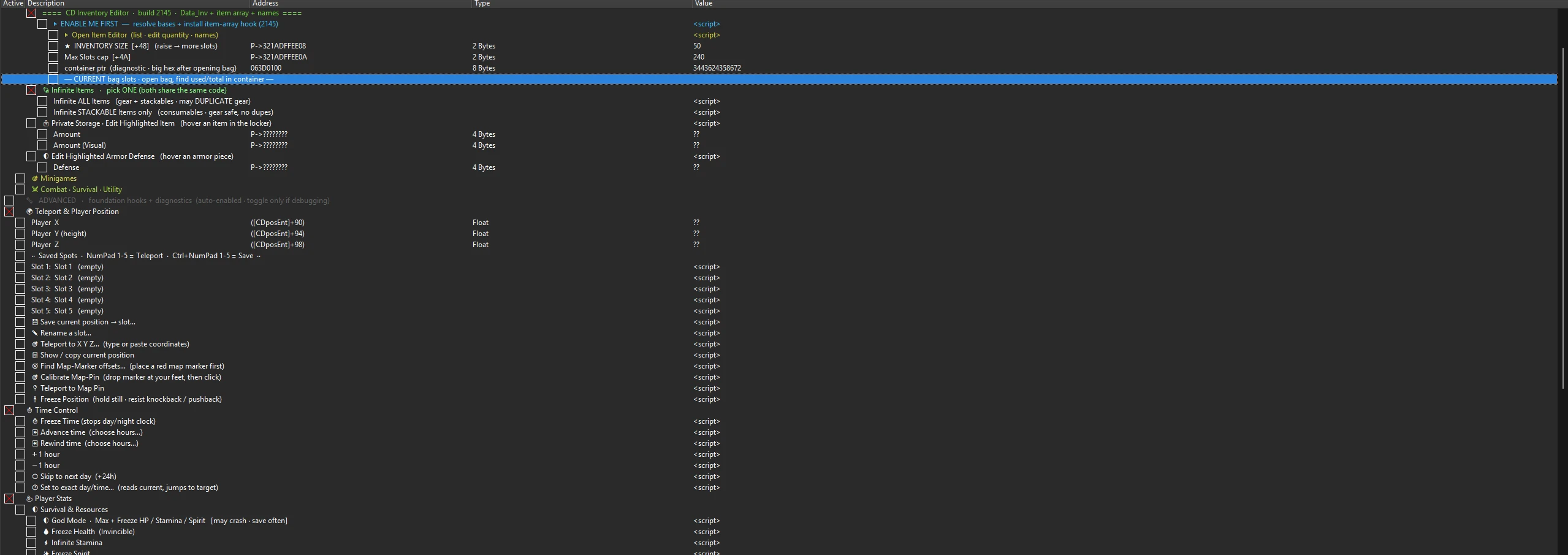
[color=#E2BA78]▸[/color] [b]Item editor[/b]: list your items, edit quantity and refine, with item names resolved.
[color=#E2BA78]▸[/color] [b]Hover editors[/b]: edit the stats of the item you are hovering, including the enchantment values inside weapons and armour.
[color=#E2BA78]▸[/color] [b]Private storage[/b] editing.
[color=#E2BA78]▸[/color] [b]Infinite items[/b]: choose all items, or stackables only (gear safe).
[color=#E2BA78]▸[/color] [b]Bag Slots[/b] group: view and edit current, cap, total, used and bonus slots, plus a one click Max Bag Space.
[size=4][b][color=#4AA3DF]Player[/color][/b][/size]
[color=#4AA3DF]▸[/color] [b]Live Stat Engine[/b]: see every player stat by key and override any of them (Attack, Defense, Crit, Attack Speed, Move Speed, resistances and more).
[color=#4AA3DF]▸[/color] [color=#4AA3DF][b]Player only[/b][/color]: stat overrides apply to you and never to NPCs.
[color=#4AA3DF]▸[/color] [b]Godmode and Resources[/b]: freeze health, stamina and spirit at maximum.
[size=4][b][color=#1ABC9C]Teleport and Player Position[/color][/b][/size]
[color=#1ABC9C]▸[/color] [b]Five savable, named locations[/b] that persist between sessions.
[color=#1ABC9C]▸[/color] [b]Teleport to coordinates[/b] you type in.
[color=#1ABC9C]▸[/color] [b]Freeze position[/b] to hold still and resist knockback.
[color=#1ABC9C]▸[/color] [b]Hotkeys[/b]: NumPad 1 to 5 teleport to a slot, Ctrl and NumPad 1 to 5 save the current spot.
[size=4][b][color=#E056A0]Reputation[/color][/b][/size]
[color=#E056A0]▸[/color] [b]Max Trust[/b] for people, pets and horses.
[color=#E056A0]▸[/color] [b]Max Contribution[/b].
[size=4][b][color=#E67E22]Combat, Survival and Utility[/color][/b][/size]
[color=#E67E22]▸[/color] [b]No Fall Damage[/b].
[color=#E67E22]▸[/color] [b]TimeScale[/b] to speed up or slow down the whole game.
[color=#E67E22]▸[/color] [b]Instant Horse Capture[/b].
[color=#E67E22]▸[/color] [b]Max Combat Stats[/b] (Attack, Defense and resistances).
[color=#E67E22]▸[/color] [b]Disable Durability Damage[/b].
[size=4][b][color=#2ECC71]Minigames[/color][/b][/size]
[color=#2ECC71]▸[/color] [b]Instant Win[/b] for the Wild West Archery and Shooting minigame.
[line]
[size=5][b][color=#E67E22]▌ Requirements[/color][/b][/size]
[color=#E67E22]▸[/color] [b]Cheat Engine 7.5[/b] or newer.
[color=#E67E22]▸[/color] Crimson Desert, [b]Title Update 1.15[/b].
[line]
[size=5][b][color=#C0392B]▌ Installation[/color][/b][/size]
[list=1]
[]Install [b]Cheat Engine[/b] (decline any bundled offers during the installer).[/]
[]Download the [b].CT[/b] file from this page.[/]
[]Launch the game and load into your save.[/]
[]Alt Tab to Cheat Engine, click the glowing computer icon at the top left, select [b]CrimsonDesert.exe[/b], then Open.[/]
[]Use [b]File[/b], [b]Open[/b] and pick the [b].CT[/b] file. Only open it, do not click Save in Cheat Engine.[/]
[/list]
[line]
[size=5][b][color=#E2BA78]▌ How to use[/color][/b][/size]
[color=#E2BA78]▸[/color] Tick [b]STEP 1[/b] once you are in world to attach. Nothing touches the game until you do.
[color=#E2BA78]▸[/color] Enable only the cheats you want by ticking their box.
[color=#E2BA78]▸[/color] For the inventory editors, open your bag in game first.
[color=#E2BA78]▸[/color] For player stats, be in world and open the character panel once, then use the Live Stat Editor.
[color=#E2BA78]▸[/color] Some cheats apply on the next action (swap your gear, greet or pet twice, take one shot). Read each entry's note.
[line]
[size=5][b][color=#E67E22]▌ Notes and Safety[/color][/b][/size]
[color=#E67E22]▸[/color] Back up your save before making large changes.
[color=#E67E22]▸[/color] Nothing is written to your game files. Untick a script or close Cheat Engine to stop.
[line]
[size=5][b][color=#2ECC71]▌ Changelog[/color][/b][/size]
[b][color=#E2BA78]v0.7[/color][/b]
[color=#2ECC71]▸[/color] Player stats are now locked to your character, so Attack Speed, Move Speed and all overrides no longer affect nearby NPCs.
[color=#2ECC71]▸[/color] Teleport is more reliable: the table only trusts a captured position that reads like a real world location, and remembers the last good one.
[color=#2ECC71]▸[/color] Bag Slots group with current, cap, total, used and bonus, plus a one click Max Bag Space.
[color=#2ECC71]▸[/color] Resource freeze confirmed for TU 1.15.
[b][color=#E2BA78]v0.6[/color][/b]
[color=#2ECC71]▸[/color] Live Stat Engine, Godmode and Resources organised under a Player section; item and enchantment hover editors under Inventory.
[color=#2ECC71]▸[/color] Removed duplicate and conflicting entries and tidied the titles.
[line]
[size=5][b][color=#E2BA78]▌ Credits[/color][/b][/size]
[color=#E2BA78]▸[/color] Table by [b]JenAri Dev[/b] and [b]economicalwhale[/b].
[/center]
正在加载版本记录…
正在加载评论…
评论在新手盒子客户端中发表,这里同步展示。