DLSS Noisy Clothing Displacement Fix
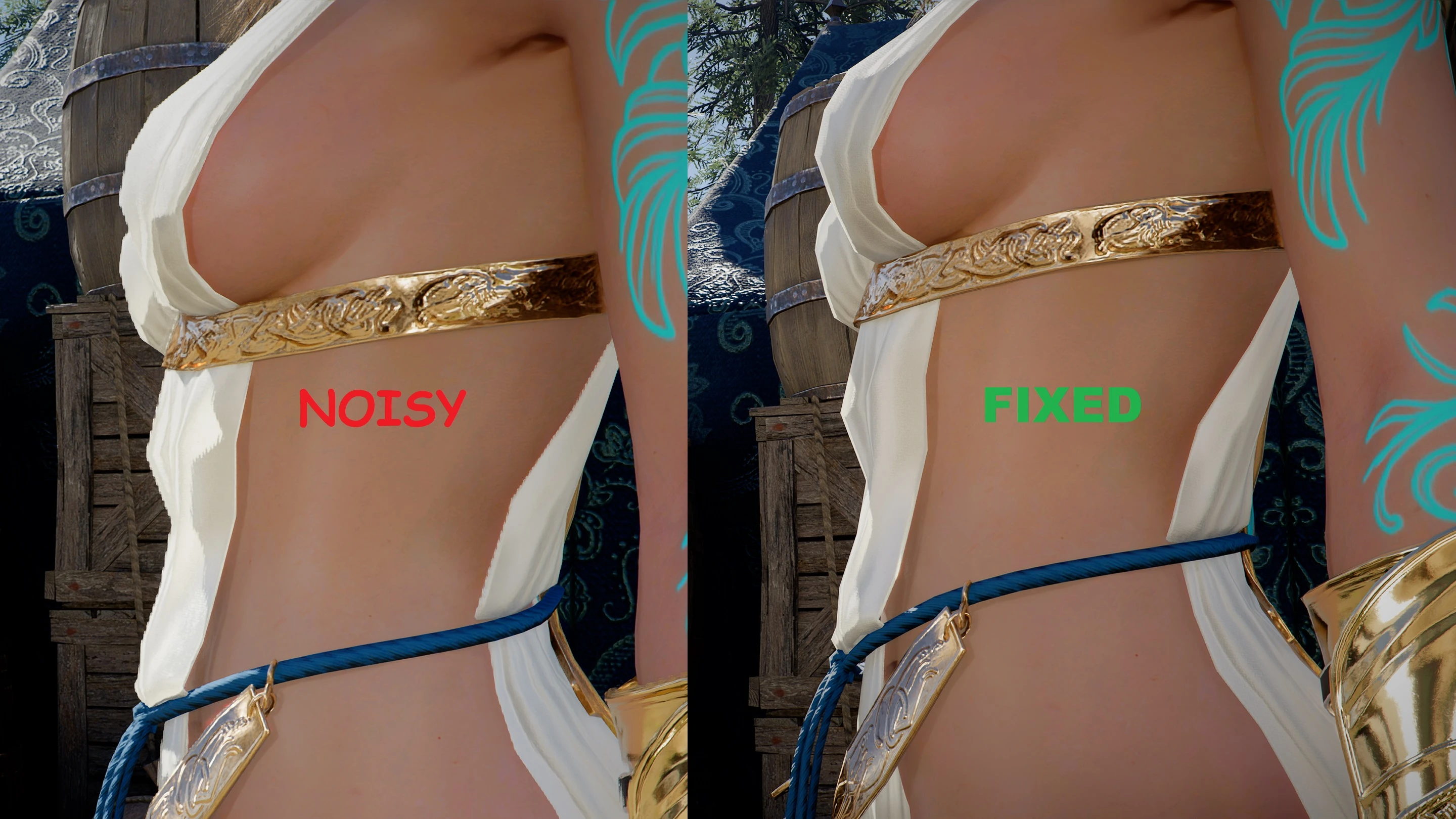
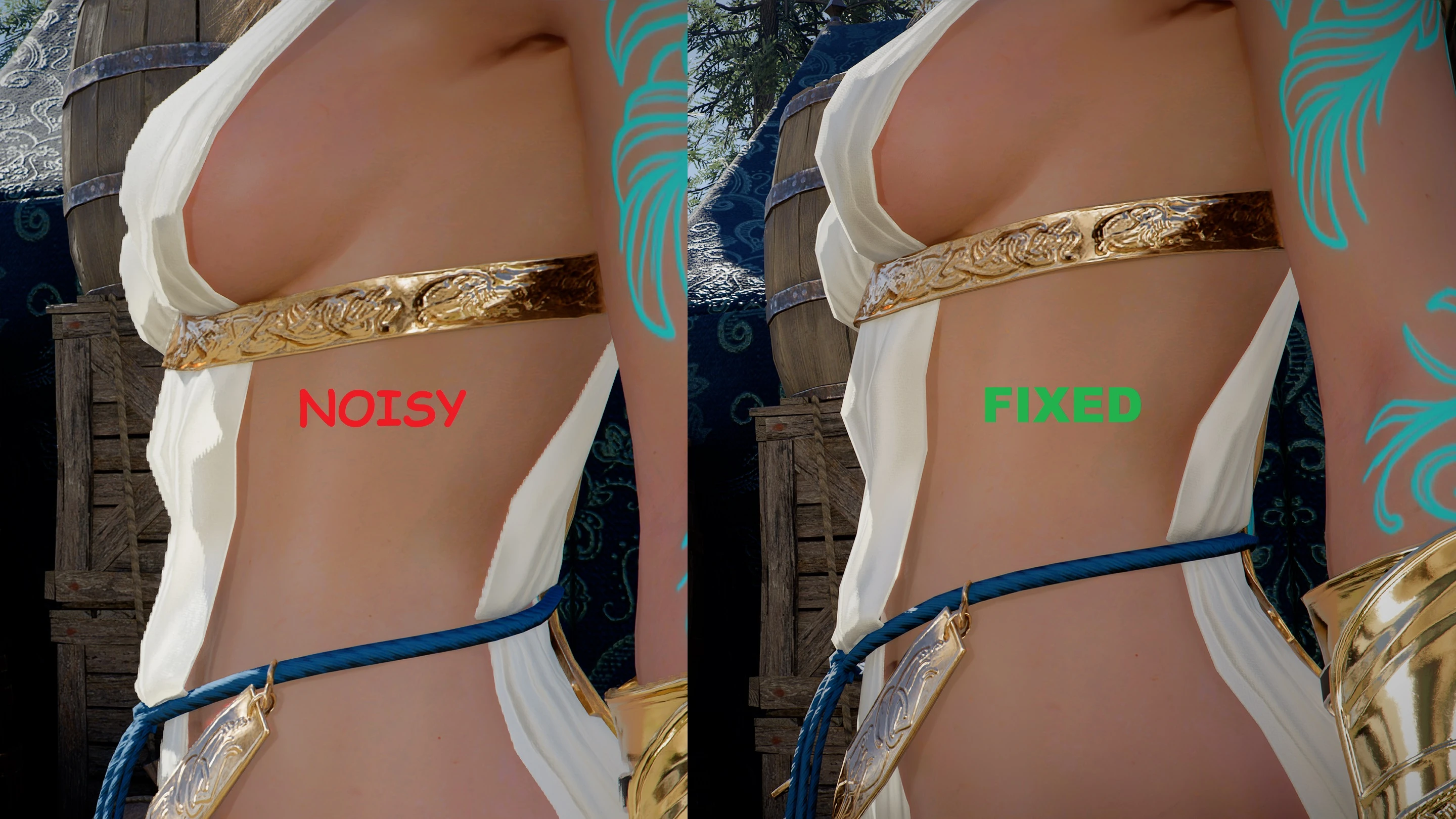
Fix for noisy edges on clothing and characters when DLSS is enabled.
 查看大图
查看大图[center][size=3][b]SSDM, Screen Space Displacement Mapping, a post-processing effect meant to simulate tessellation cheaply.[/b][/size][/center]
[center][size=3][b]Great idea for increasing silhouette detail, unless you mess up the DLSS pipeline.[/b][/size][/center]
[center][size=3][b]You didn't mess up the DLSS pipeline, did you, Pearl Abyss?[/b][/size][/center]
[center][size=3][b] [/b][/size][/center]
[center][size=3][b]Oh, you did...[/b][/size][/center]
[center] [/center]
[center] [/center]
[center]DLSS and SSDM do not play nice together if done wrong, and Pearl Abyss did indeed do it wrong. You might have noticed the fuzzy, shimmering edges on rocks when the Displacement setting is on? That's our friend here, SSDM, having a fight with DLSS.[/center]
[center] [/center]
[center][i]"But we can disable Displacement, right?"[/i][/center]
[center]Indeed we can, and that completely fixes the terrain artifacts.[/center]
[center] [/center]
[center]However! SSDM is still enabled for all clothing, armor, weapons and characters for some unholy reason.[/center]
[center]The result is pixelated, noisy edges on everything character related, from your finest silk shirt to the edge of your blade. [/center]
[center] [/center]
[center][b]Well, no more I say![/b][/center]
[center] [/center]
[center]I've disabled SSDM for character related rendering, making a much cleaner, more stable image.[/center]
[center]If you want to play with tessellation, feel free to turn on Displacement in settings. Everything will be the same as before (fuzzy rocks included), but anything related to characters will remain clean and sharp.[/center]
[center]I find Low to be the best compromise between Off (but not really) and High (way too noisy).[/center]
[center] [/center]
[center]Unfortunately, disabling SSDM for terrain while Displacement is On, make things a bit funky. Haven't found the trick to un-funk it yet.[/center]
[center] [/center]
[center] [/center]
[center]Two versions are available:[/center]
[center] [/center]
[center][b]DLSS Noisy Clothing Displacement Fix[/b][/center]
[center]This edit is of the base .xml, no other changes.[/center]
[center][i] [/i][/center]
[center][b]DLSS Clothing Displacement Fix for EiG v3.1.6d[/b][/center]
[center]This edit is compatible with [url=https://www.nexusmods.com/crimsondesert/mods/651]Enhanced Internal Graphics mod[/url] by VAXIStaa.[/center]
[center] [/center]
[center] [/center]
[center][b]Requirements:[/b]
Pretty simple .xml replacement mod. Mount with your favorite mod-manager.[/center]
[center]Testing done with DMM, so that's the supported loader.[/center]
[center] [/center]
[center][b]Installation:[/b]
Import into mod-manager and mount.[/center]
[center][b]IMPORTANT:[/b] Load after any mod that conflicts, or my mod will just be overwritten.
[b]Thanks to:[/b]
[url=https://www.nexusmods.com/crimsondesert/mods/651][b]Enhanced internal Graphics[/b][/url]
[url=https://www.nexusmods.com/crimsondesert/mods/2974][b]NaiK Elf Ears for Damiane Body[/b][/url]
[url=https://www.nexusmods.com/crimsondesert/mods/2168][b]Damiane Nude Mesh and Textures[/b][/url]
[url=https://www.nexusmods.com/crimsondesert/mods/826][b]Crimson Desert Mod Workbench (CDMW)[/b][/url]
[url=https://www.nexusmods.com/crimsondesert/mods/1292][b]Crimson Game Mods Tool[/b][/url]
[url=https://www.nexusmods.com/crimsondesert/mods/633][b]Definitive Mod Manager (DMM)[/b][/url][/center]
正在加载版本记录…
正在加载评论…
评论在新手盒子客户端中发表,这里同步展示。